Tips & Guides
Sudoku Notes: Find and Update Candidate Numbers
Learn how to calculate Sudoku candidates, keep pencil marks current, and distinguish a possible number from a proven answer using a worked grid.
Explore the guide
Calculate a complete candidate setExample: two cells that still allow 7 and 9Update notes after a confirmed entryAvoid these note-taking trapsPractice: would a nearby note remove 7?Sudoku notes, or pencil marks, record digits that have not yet been ruled out for an empty cell. They help compare possibilities; they are not answers and do not prove a placement by themselves.
Calculate a complete candidate set
Start with 1–9 and remove every digit already present in the cell’s row, column or box. The digits left are its candidates under the Classic rules. In Killer Sudoku, cage totals and the cage no-repeat rule can remove further possibilities.
If you record only two interesting digits from a larger set, do not later treat them as a complete list. Both naked-single and hidden-single reasoning depend on checking all relevant possibilities.
Example: two cells that still allow 7 and 9
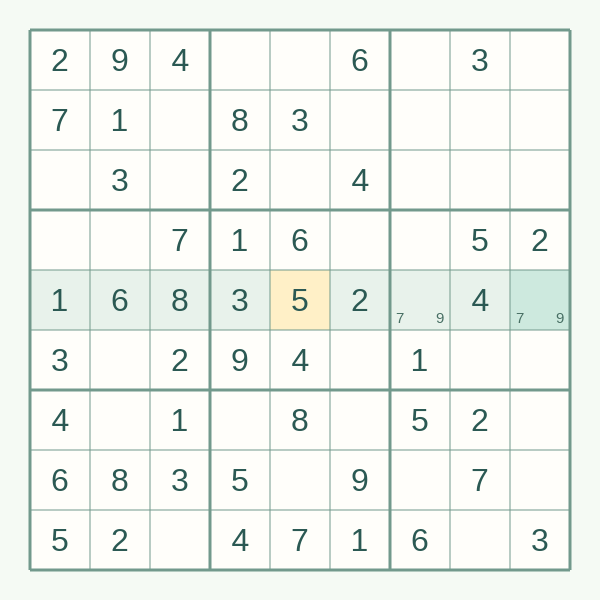
The teaching grid has already placed 5 at r5c5. Row 5 now lacks 7 and 9, and its remaining empty cells are r5c7 and r5c9. Neither cell’s column or box removes either value. Both cells therefore have candidates {7, 9}.
These notes make the uncertainty explicit. They do not tell you which cell receives which digit. The earlier naked-single deduction explains why the 5 was certain while these two cells remain open.
Update notes after a confirmed entry
- Enter a digit only when you have a valid deduction.
- Remove it from notes in other cells of the same row, column and box.
- Recheck the affected cells. One remaining candidate may be a naked single; zero candidates signals an inconsistency to investigate.
If an answer is erased or undone, a removed candidate may become possible again. Recompute from the current board rather than only deleting more notes. The Web game offers Notes and Undo; a note is still something you should check against the board.
Avoid these note-taking traps
- Writing the intended answer as a small digit and then treating it as a clue.
- Eliminating a candidate merely because it is written in a neighbouring cell. Notes do not act like confirmed entries.
- Using an incomplete set to justify a hidden single.
Practice: would a nearby note remove 7?
In the example, another empty cell has a pencil mark 7. Can that alone remove 7 from r5c9?
Check the answer
No. A possible 7 elsewhere is not a placed 7. You need a confirmed entry or a valid elimination pattern before removing that candidate. Keep {7, 9} until the board gives you more evidence.
Practise with Notes →Select a cell, turn Notes on, then tap a digit. Turn Notes off to enter an answer.
Read next
Naked Singles in Sudoku: One Cell, One CandidateHidden Singles in Sudoku: One Digit, One LocationClassic Sudoku Rules: Rows, Columns and BoxesAbout the examples
Written with AI assistance for Zen Sudoku. Classic candidate deductions and cage arithmetic are checked by automated validation. Figures are teaching examples; incomplete cage fragments are labelled. Language wording awaits editorial review.